

These plugins are no longer supported.
Please download and try Peeler which incorporates all the features of these plugins plus more.
The Peel Off White filter is useful for silhouetting objects that you will later use in composite images by "lifting" them off of white, or light colored backgrounds. If you apply the filter, then paint behind the pixels with white using the "Behind" mode, you can create an opaque image with perfectly feathered edges that don't have that "clipping path" or "evenly feathered" look.
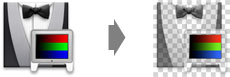
The Gray To White filter is very useful for cleanly increasing the color saturation of an image without "blowing out" any pixel colors like even moderate "Hue/Saturation" adjustments can do. By repeatedly duplicating layers and applying the filter, you can make extreme saturation adjustments without degrading image quality.

The Gray To Black filter is very useful for lightening the shadows in an image without "washing out" any pixel colors or creating posterized regions like "Level", "Curves" and "Brightness/Contrast" adjustments can do. It is not effective unless the shadows still contain some color since pixel values that are pure gray will not be affected by this technique.

These plug-ins were originally created using the Filter Factory, a customizable plug-in found on the Adobe Photoshop Deluxe CD-ROMs. Newer versions have been made using Filter Foundry by telegraphics because filters made with the original Filter Factory no longer run under Mac OS X native versions of Adobe Photoshop.

What do they cost? Nothing. These plug-ins are distributed as freeware :)

Includes plugins for
Photoshop 3 to CS5

Like other Photoshop plug-in filters, simply copy these filters into your Photshop Plug-Ins folder and restart Photoshop. Full instructions are included in the ReadMe file included with the plug-ins.